



GPT Image 1.5
GPT Image 1.5 is a text‑to‑image and image‑editing model that produces high‑fidelity images suitable for production use. It is positioned as the successor to GPT-4o Image or GPT Image 1 with stronger prompt adherence, better detail, and more robust handling of complex scenes. Try GPT Image 1.5 below!
Key Features of GPT Image 1.5
- Enhanced Realism: Delivers greater photorealistic fidelity and overall production-grade quality
- Precise Editing with Consistency Maintained: Performs targeted edits with exceptional precision
- Improved Text Rendering: Improved in managing denser, and more natural-looking typography
Enhanced Realism and Production Quality
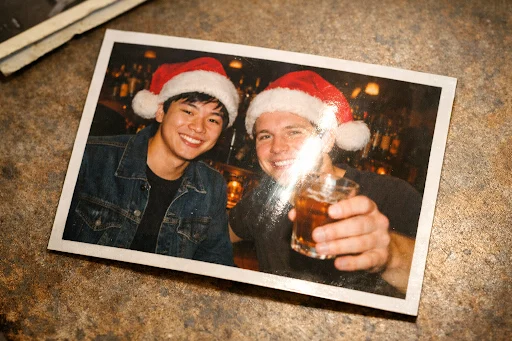
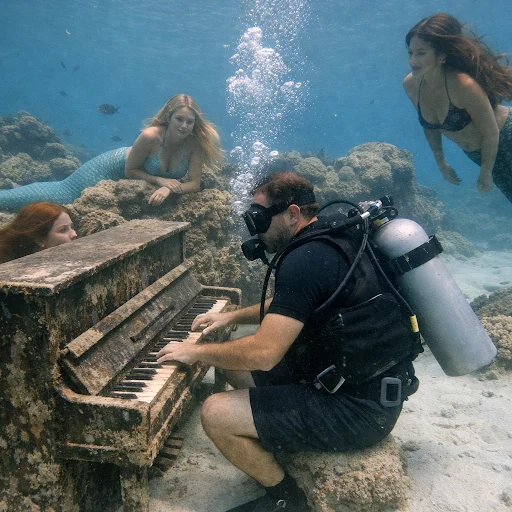
GPT Image 1.5 delivers greater photorealistic fidelity and overall production-grade quality, with built-in reasoning that ensures more accurate and controllable outputs. It handles challenging elements like group compositions, subtle lighting variations, and intricate details with higher reliability, making outputs feel polished and professional.
| Prompt | Output Image |
| Generate an image of a printed retro photo of a young asian man and a young white man in santa hats at a bar, one of them is holding a drink. There should be camera flashlight glare visible on the printed photo. The printed photo should also have a thin white border visible, and should be slightly rotated. |
 |
| A diver playing an underwater piano with mermaids watching. Hyper-realistic amateur photography |
 |
Precise Image Editing with Consistency Maintained
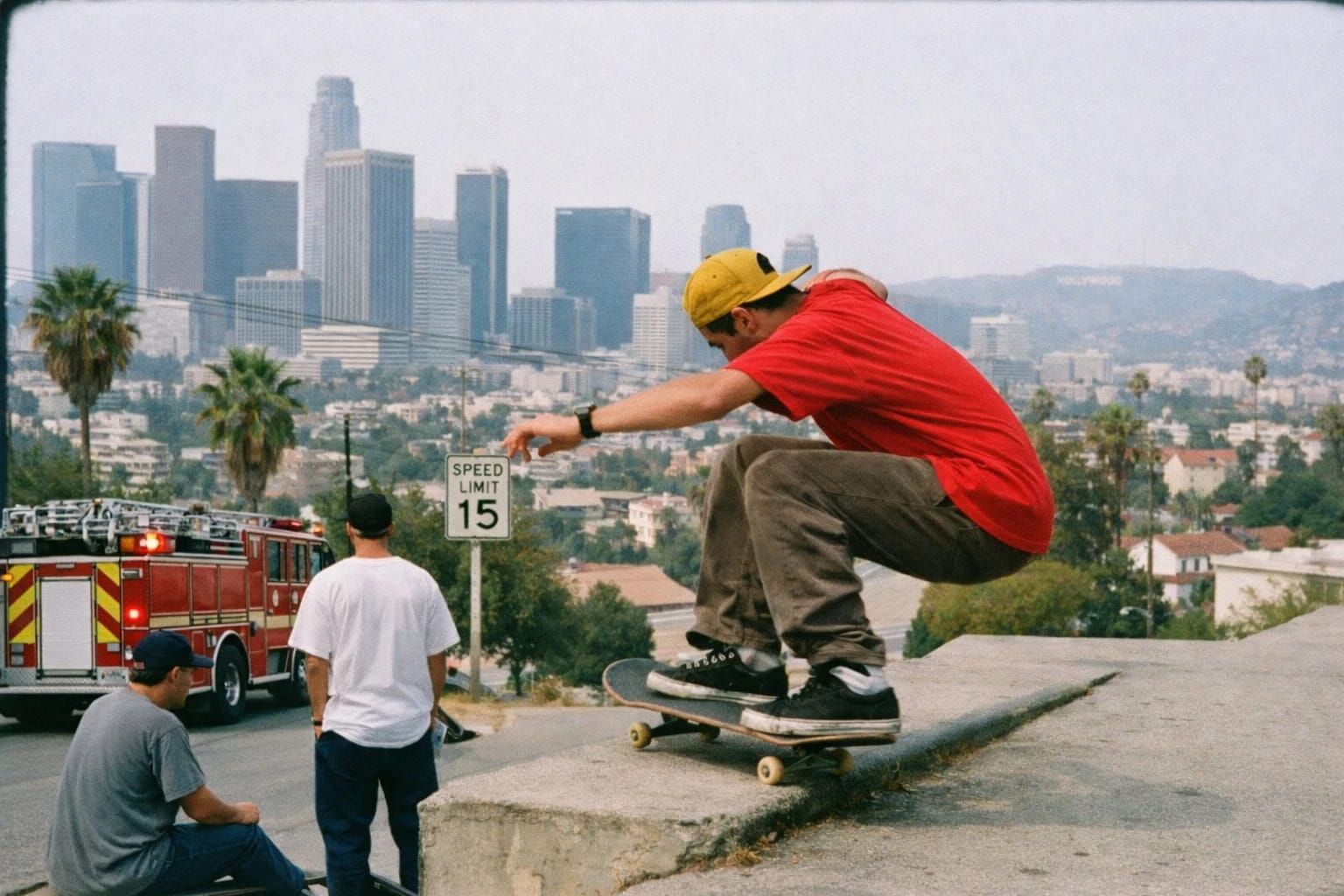
Another standout improvement in GPT Image 1.5 is its ability to perform targeted edits with exceptional precision, preserving critical details across generations and iterations. It excels at tasks like adding or removing objects, blending elements seamlessly, trying on clothing or hairstyles virtually, or applying stylistic transformations—all while maintaining consistency in lighting, composition, faces, logos, and overall scene integrity.
| Input Image | Prompt | Output Image |
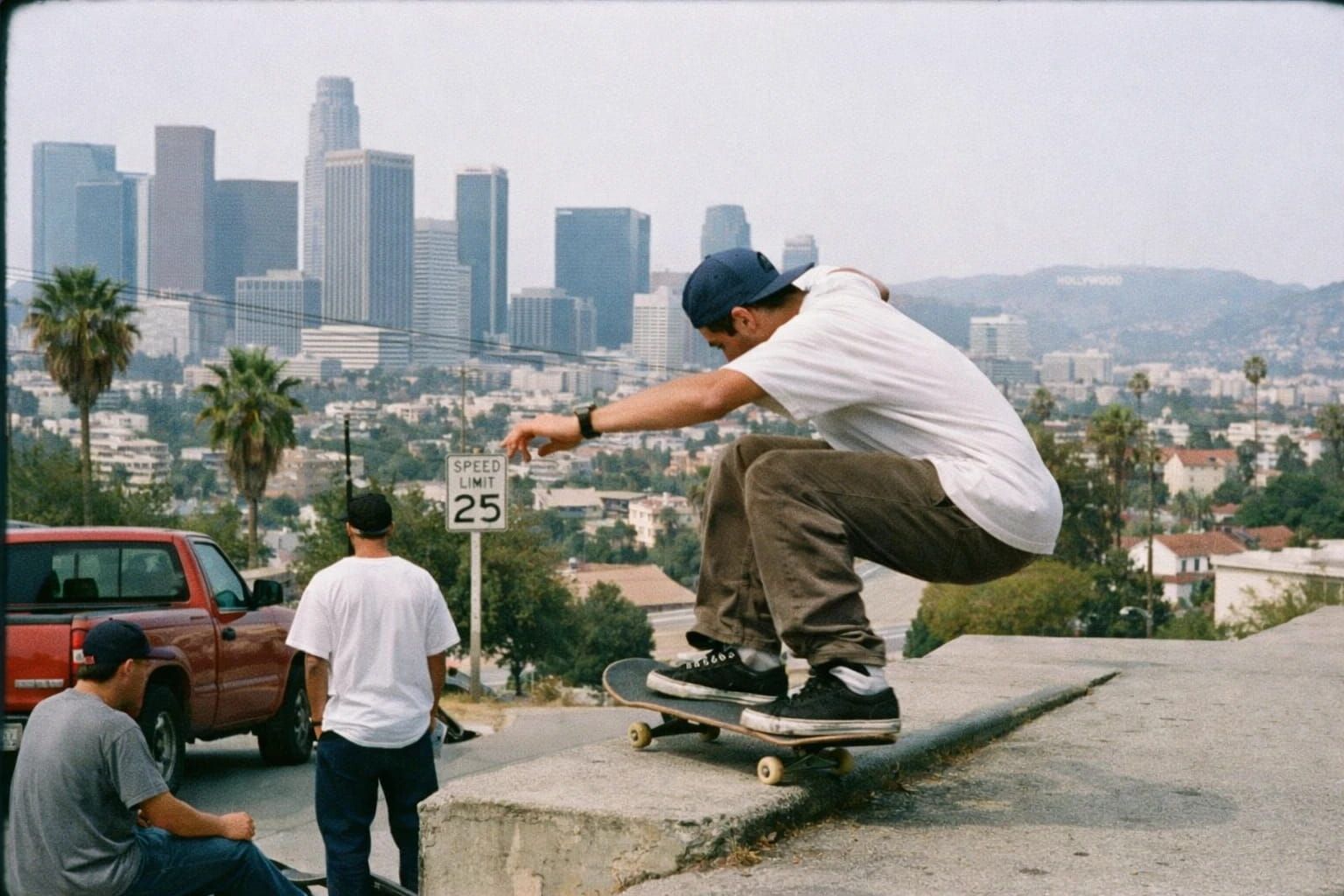 |
make his shirt red, his hat yellow, the speed limit 15, and the truck a firetruck |
 |
Improved Text Rendering
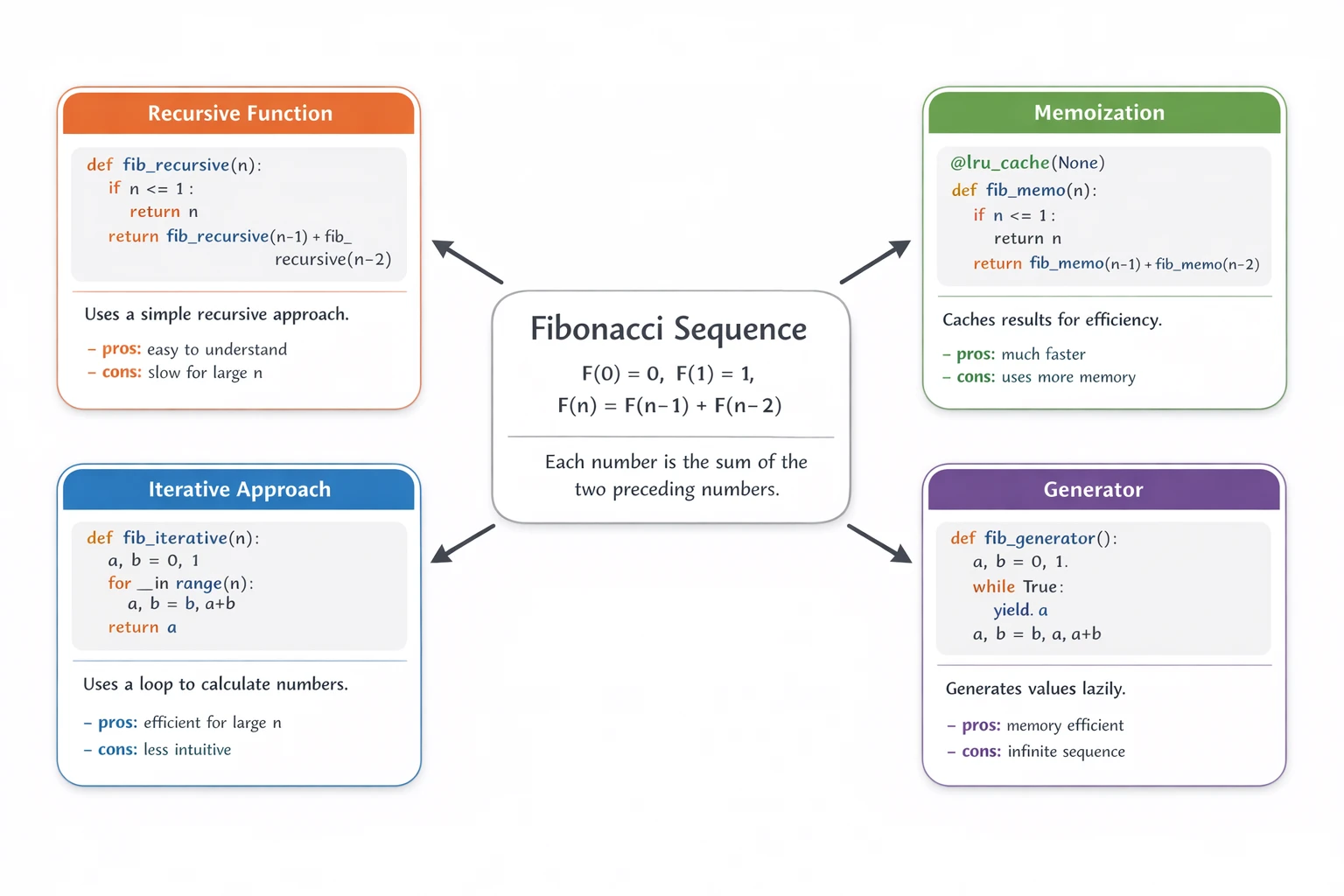
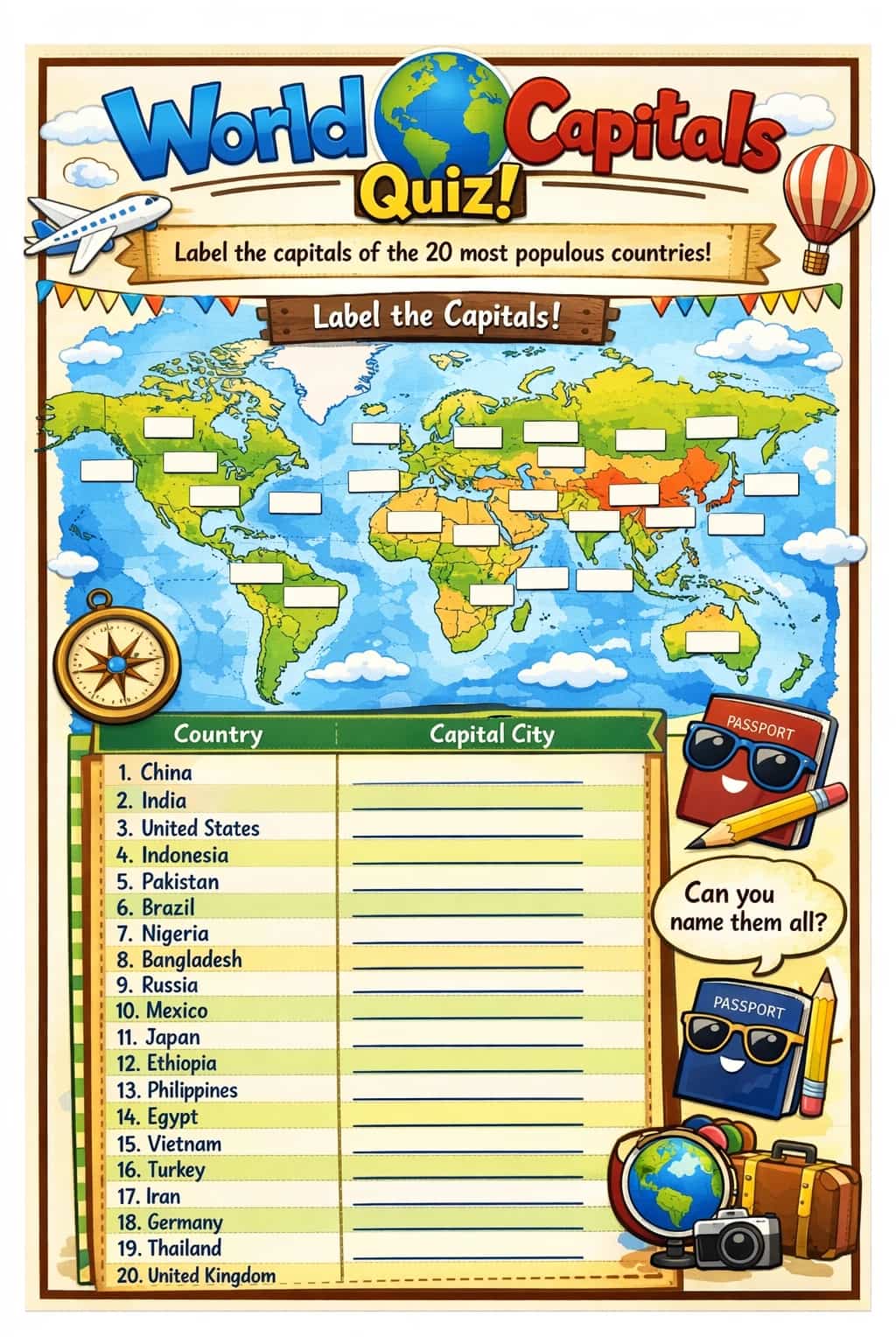
GPT Image 1.5 takes a significant step forward in rendering text within images, managing denser, smaller, and more natural-looking typography than ever before. Previous models often struggled with legible text in complex layouts, but this version produces clear, readable letters even in challenging scenarios like infographics, newspaper articles, diagrams, or posters.
| Prompt | Output Image |
| How does the Fibonacci sequence work? Explain it using both math and code.
Place a simple mathematical definition and short explanation at the center of the image. Around the central math explanation, show four boxed Python implementations of the Fibonacci sequence, using different approaches or styles. Prefer Python solutions that rely on standard python library abstractions. Each implementation should be rendered inside a rounded-rectangle card with a subtle drop shadow and should contain, in order: - a clear title at the top Draw clear arrows pointing from the central math explanation to each implementation card. Keep the layout clean and visually structured, using a modern, professional infographic style. Use a pure white background, a neutral base color palette, and give each implementation card a distinct accent color, with clear spacing throughout. |
 |
| create an image of a worksheet I can use to quiz my sixth graders on world capitals? use a world map that they can label. focus on capitals for the top 20 most populous countries. make it fun and visually appealing! |
 |
GPT Image 1.5 VS Google Nano Banana Pro
| Feature | GPT-Image-1.5 | Nano Banana Pro |
| Developer | OpenAI | Google DeepMind |
| Release Date | December 2025 | November 2025 |
| Base Model | Proprietary image generation model | Gemini 3 Pro |
| Key Strengths | Faster generation (up to 4x previous), precise editing with detail preservation (faces, logos, lighting), strong prompt adherence, improved dense/small text rendering | Studio-quality precision, search grounding for factual accuracy, multi-reference support (up to 14 images), multilingual text, advanced controls (camera, lighting, depth of field) |
| Resolution | Up to 1.5K (e.g., 1536x1024 supported in API) | Up to 4K |
| Use Cases | General creation, editing, professional visuals with strong fidelity | Professional design, infographics, brand consistency, grounded factual images |
How to Use GPT Image 1.5 on HIX AI
Enter Your Input
Enter your text prompt and optionally upload your image to start the generation.
Get the Output Image
View and download the generated image.
YouTube Videos About GPT Image 1.5
Reddit Posts About GPT Image 1.5
X Posts About GPT Image 1.5
OpenAI released GPT Image 1.5, their new flagship image generation model rolling out today to all ChatGPT users and API users globally, generating images up to 4x faster and ranking first on Image Arena benchmarks
— Tibor Blaho (@btibor91) December 16, 2025
- GPT Image 1.5 makes precise edits keeping details intact,… pic.twitter.com/RCz6IFwPTR
GPT Image 1.5 achieves both #1 in Text to Image and Image Editing in the Artificial Analysis Image Arena, surpassing Nano Banana Pro
— Artificial Analysis (@ArtificialAnlys) December 16, 2025
GPT Image 1.5 is OpenAI’s newest flagship image generation model, demonstrating improved image quality and prompt fidelity relative to earlier… pic.twitter.com/fWN5HeNvOw
GPT Image 1.5 from OpenAI is officially live on ChatGPT and the APIs with better instruction following, precise editing and faster image generation speed.
— TestingCatalog News 🗞 (@testingcatalog) December 16, 2025
The feed will turn into GPT Image gallery again 👀 https://t.co/903tOdWkME pic.twitter.com/SmnJl6d0xs
🚨BREAKING: Image Arena Shakeup@OpenAI’s gpt-image-1.5 and chatgpt-image-latest are now available in the Arena.
— lmarena.ai (@arena) December 16, 2025
🥇gpt-image-1.5 is #1 in Text-to-Image (1264)
🥇chatgpt-image-latest is #1 on Image Edit (1409)
🔹gpt-image-1.5 #4 in Image Edit (1395)
gpt-image-1.5 holds a… https://t.co/rtKIaJmCHd pic.twitter.com/LxlHliN3VF
🧩 OpenAI rolled out the new ChatGPT Images for more reliable edits and up to 4x faster image generation.
— Rohan Paul (@rohanpaul_ai) December 16, 2025
The new version, called GPT Image 1.5, will be available to all ChatGPT users and through the API. It’s powered by GPT 5.2, which early users say delivers strong results for… pic.twitter.com/6xFq7BpD2s
GPT-Image-1.5: 63/100
— Angel ❄️ (@Angaisb_) December 16, 2025
(Provisional results, more testing needed)
Other models for reference:
- Nano Banana Pro: 69/100
- GPT-Image-1: 23/100
Overall, I'm pretty happy with v1.5, although I'll keep using Nano Banana Pro most of the time https://t.co/GpsqIZ2TkH
The King is back. GPT-Image-1.5 has officially claimed the #1 spot on Image Arena with a massive score of 1344, creating an unprecedented gap of nearly 80 points between it and the runner up. We haven't witnessed a jump in model capability this significant since the release of… https://t.co/HKXY9R2DHm pic.twitter.com/OAQh5kSBrI
— Dustin (@r0ck3t23) December 16, 2025
Hold on, the OpenAI’s new image model has no better quality in image generation itself but
— Chubby♨️ (@kimmonismus) December 16, 2025
- Stronger instruction following
- Precise editing
- Detail preservation
- 4x faster than before?
Probably that’s why they call it image1.5 instead of image 2. they know they won’t… https://t.co/LhjqqJ7khJ pic.twitter.com/u7JXPt3FfY
GPT-Image-1.5 is a really good image model! https://t.co/21Blp5VuTY
— Sherwin Wu (@sherwinwu) December 16, 2025
ChatGPT Images 1.5 by @OpenAI is powered by a new flagship image generation model, offering stronger instruction following, precise editing, better detail preservation, and performance that is 4× faster.
— Mark Kretschmann (@mark_k) December 16, 2025
This model is still based on GPT-4o! Images V2 is coming next year with… pic.twitter.com/ihlsDpvUFS
FAQs
How is GPT Image 1.5 different from previous versions?
Compared to GPT-4o, it generates more realistic images, follows complex prompts more accurately, preserves faces and layouts during edits, and runs up to about four times faster at a lower per-image cost.
What can GPT Image 1.5 do?
It can create images from text, edit existing photos, combine multiple reference images, and handle detailed layouts such as infographics, UI mockups, and marketing visuals.
How good is GPT Image 1.5 at photorealism?
GPT Image 1.5 is optimized for high-fidelity photorealism, with natural lighting, accurate materials, and rich textures suitable for production-quality visuals.
What kind of prompts work best for GPT Image 1.5?
Clear, structured prompts that specify subject, setting, style, and key visual details (such as lighting or camera angle) tend to produce the most consistent results.
Can GPT Image 1.5 follow a very detailed art direction?
GPT Image 1.5 is built for tight instruction following, including camera language, color specifications, layout constraints, and multi-step editing instructions.