



Google Nano Banana (Gemini 2.5 Flash Image)
Google Nano Banana is the codename for an AI image model officially named Gemini 2.5 Flash Image, developed by Google's DeepMind. It is integrated into Google's Gemini app and offers advanced image generation and editing capabilities, focusing especially on maintaining character and scene consistency. Try the Google Nano Banana AI image model on HIX AI below!
Explore Google Nano Banana's Different Models
Key Features of Google Nano Banana AI Image Model
- Excellent Character and Style Consistency: Maintaining consistency of characters, objects, or styles of the original images
- Multi-Image Fusion: Fuse up different input images into a new single seamless image
- Visual Reasoning and World Knowledge: Able to handle complex image generation involving reasoning
Excellent Character and Style Consistency
Maintaining character and style consistency is one of the most prominent features of Nano Banana (Gemini 2.5 Flash Image). Nano Banana AI image model excels here by enabling users to place the same character or product across different scenes or perspectives without losing identity or visual style.
The following are some examples illustrating its character and style consistency:
Making Action Figures of Anime Characters
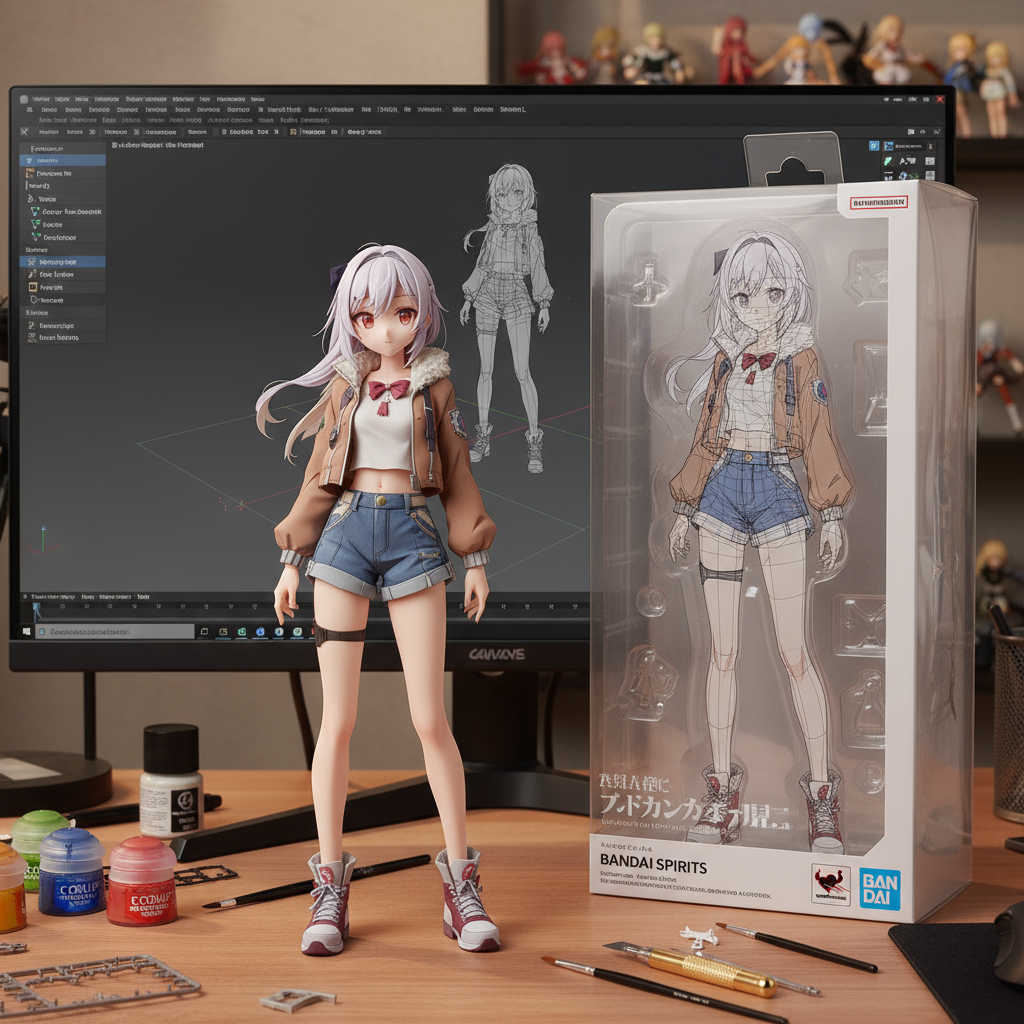
Nano Banana AI image model allows you to create realistic action figure photos from images of anime characters. Below are some examples.
| Input image & prompt | Output image |
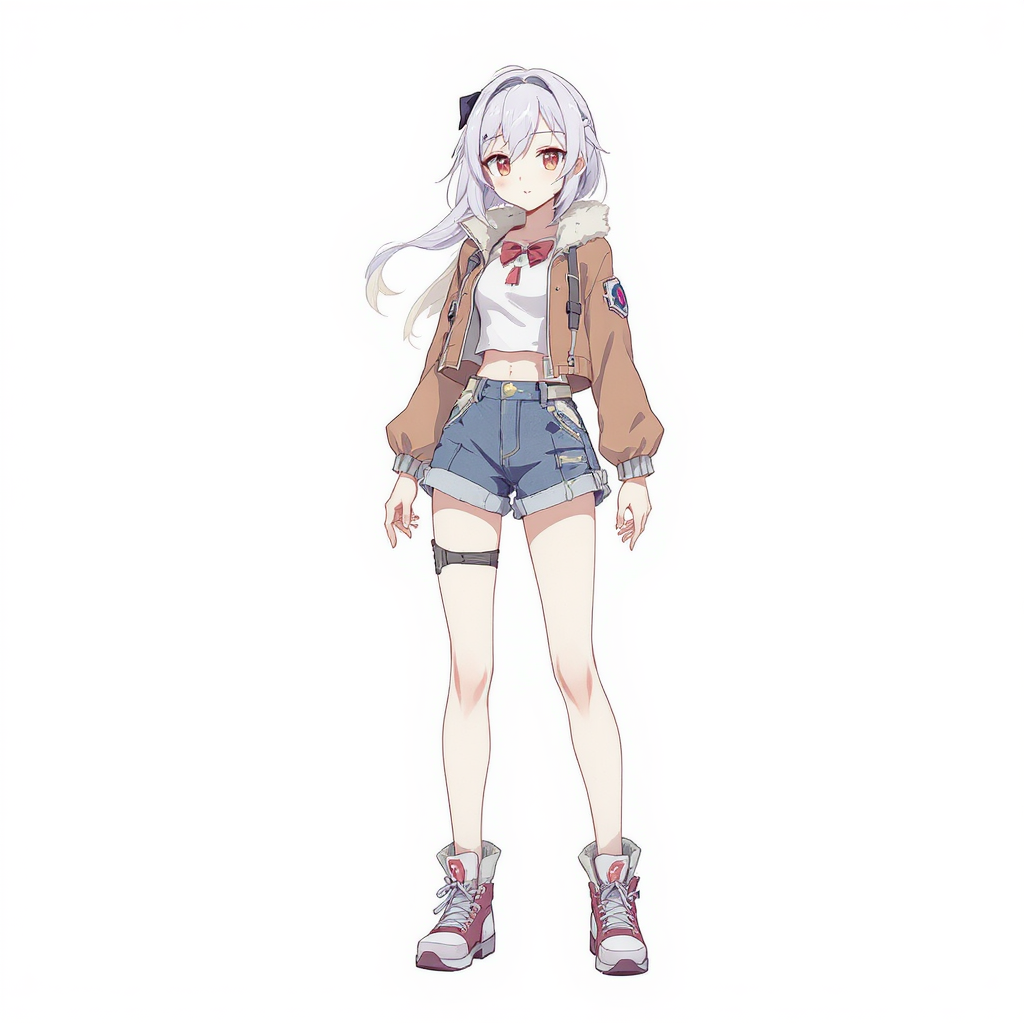 Prompt: Create a realistic style 1/7 scale action figure of the character in the image, in a real environment. The figure is placed on a computer desk. The content on the computer screen is the C4D modeling process of the figure. Next to the computer screen is a BANDAI-style plastic toy packaging box with the original illustration printed on it. There are also tools for making figures on the computer desk, such as paintbrushes, paints, small knives, etc. |
 |
Not for sale
— TianZ (@Tian416) August 23, 2025
*generated by Nano Banana pic.twitter.com/b1OeLF9xOI
Whoever trained nano-banana model did a spectacular job pic.twitter.com/m9SF6oBLmm
— Tepobeso (@beet_oops) August 17, 2025
Add or Edit Specific Elements
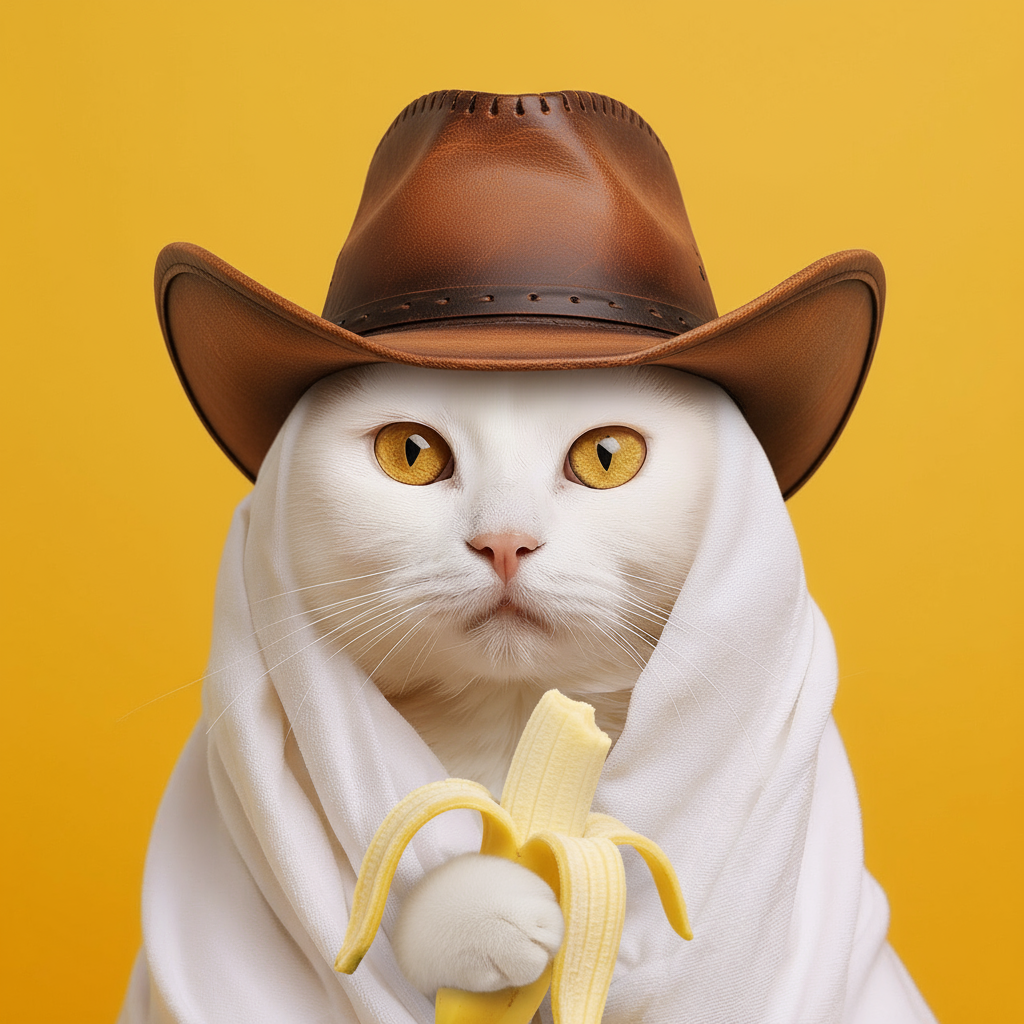
Nano Banan can offer stronger ability to help you modify specific elements within an image without affecting the surrounding areas, the style, perspective, and lighting of the images.
| Input image & prompt | Output |
 Prompt: Make the cat in this image wear a cowboy hat and hold a banana in its hand. |
 |
 Prompt: Change the color of the dress to blue |
 |
Multi-Image Fusion
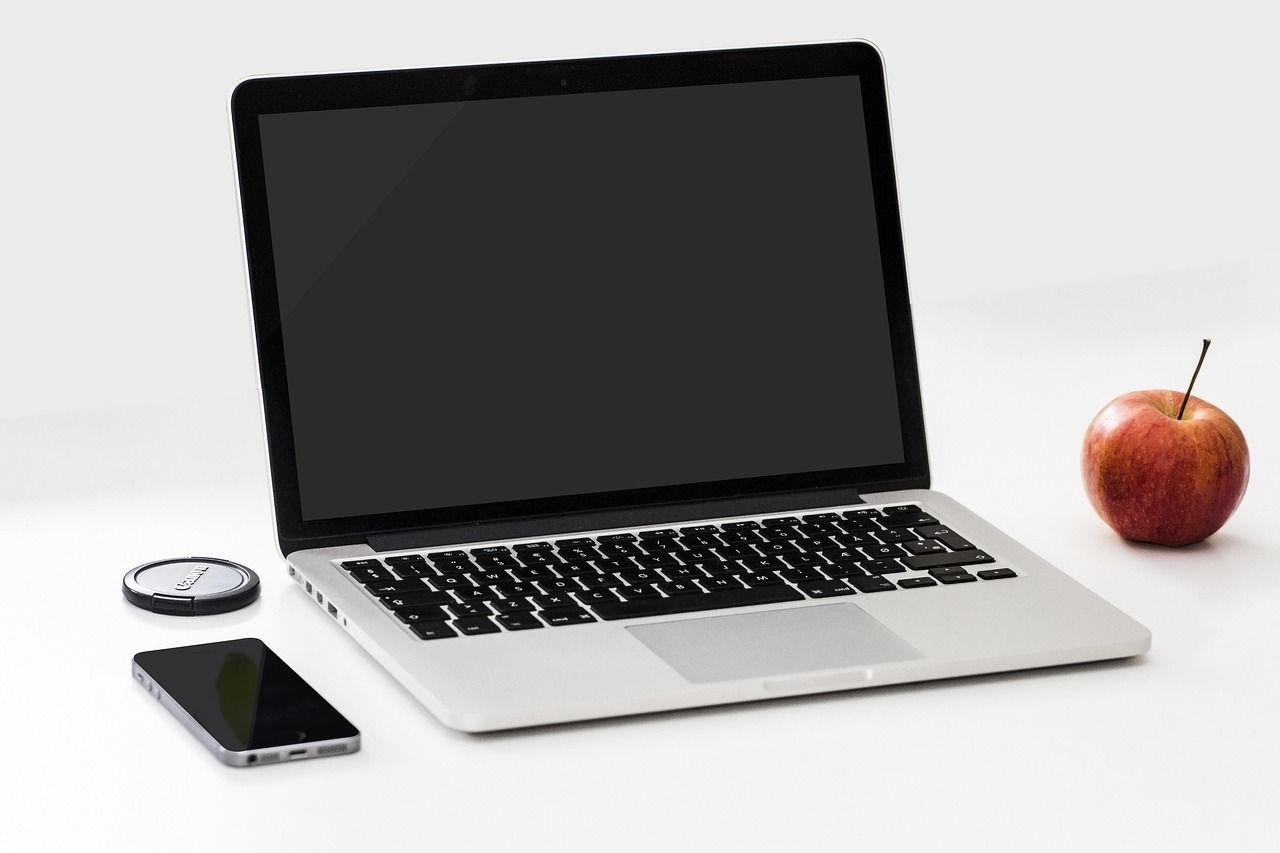
Another standout capability of Nano Banana AI image model is its ability to fuse up different input images into a new single seamless image. This is useful for combining various elements such as placing a product into a new setting, restyling environments, or creating new advertisements blending multiple references. The fusion respects visual coherence and lighting, making the generated image look natural and realistic.
| Input images |
 |
 |
 |
| Prompt | Place the laptop on the desk in the office. And make the woman sit in the chair on the left side of the photo, working on the laptop. | ||
| Output |
 |
||
Visual Reasoning and World Knowledge
Nano Banana benefits from Gemini's deep world knowledge to handle complex image editing and generation tasks that extend beyond simple aesthetics.
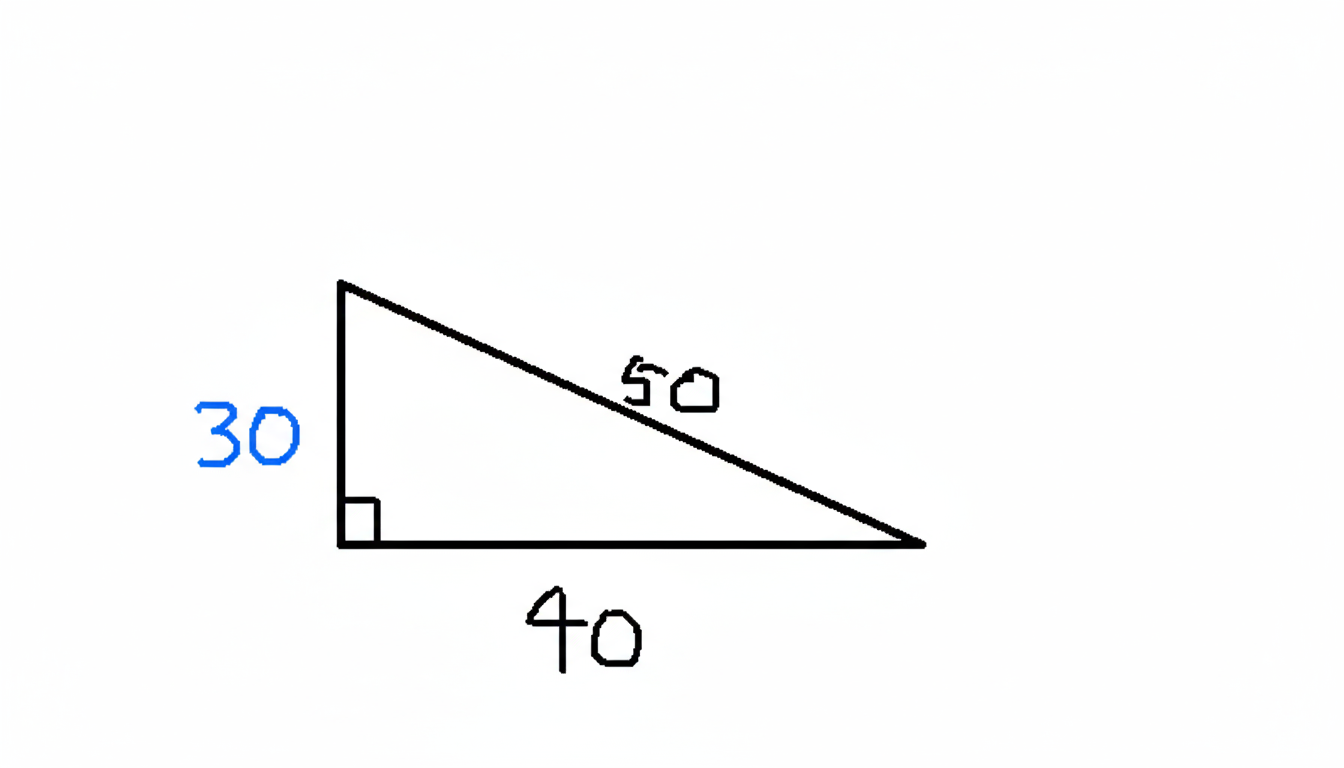
It can understand hand-drawn diagrams, follow multi-step instructions in a single prompt, and interpret scenes with semantic awareness. This makes it more versatile for educational tools, interactive applications, and real-world problem-solving scenarios where context and reasoning matter.
| Input image & prompt | Output |
 Prompt: Solve x, with x replaced with the correct value written in blue. |
 |
Nano Banana 1 vs Nano Banana 2
Find out more details in our comparison between the original Nano Banana and its successor, Nano Banana 2.
| Aspect | Nano Banana 1 | Nano Banana 2 |
| Generation Speed | ★★★★ | ★★★★★ |
| Overall Aesthetic | Capable | Refined |
| Editing Capabilities | Supported basic text-to-image and standard image editing functions. | Introduces state-of-the-art composition and advanced style transfer natively within the chat. |
| Prompt Adherence | ★★★ | ★★★★ |
| Text Rendering | Often struggled with complex typography and longer phrases. | Significantly more reliable at rendering legible, accurate text seamlessly integrated into the image. |
| Photorealism | Good | Convincing |
| Ecosystem Role | Served as the reliable baseline generative image model. | Powers the fast, deeply integrated image generation and complex editing across the Gemini ecosystem. |
How To Use Google Nano Banana AI on HIX AI
Choose the Nano Banana Model
Go to the HIX AI image-to-image-ai generator and choose the Google Nano Banana model.
Input Your Prompt
Upload your images and input your text prompt.
Start the Generation
Click Create and get the output image in a moment.
YouTube Videos About Google Nano Banana (Gemini 2.5 Flash Image)
Reddit Discussions About Google Nano Banana (Gemini 2.5 Flash Image)
Google really raised the bar with nano banana, scary how good and accurate it is.
byu/Mephistophilis44 insingularity
Posts from the localllama
community on Reddit
Posts from the singularity
community on Reddit
X Posts About Google Nano Banana (Gemini 2.5 Flash Image)
🚨🍌Big Reveal: who was "Nano Banana?"
— lmarena.ai (@lmarena_ai) August 26, 2025
The anonymous model, “nano-banana,” that caught the world's attention with its ability to follow complex instructions, preserve character identity, and maintain contextual details was:
Gemini-2.5-Flash-Image-Preview by @GoogleDeepMind 🍌✨… https://t.co/O1wpnbxaK3 pic.twitter.com/U4va9hJabk
AI just went B-A-N-A-N-A-S…
— Amira Zairi (@azed_ai) August 27, 2025
Meet Nano Banana, a tiny but insanely powerful AI model that upgrades your workflow like a cheat code 🍌
It’s fast, lightweight, and feels illegal to be free.
Here’s how to use it for FREE, with 13 use cases + prompts.
Bookmark this for later pic.twitter.com/fGRY9yX8LB
nano-banana attempt to restore the first photo ever taken pic.twitter.com/k2QiwkYGhI
— Denis Shiryaev 💙💛 (@literallydenis) August 26, 2025
Nano-banana is probably the best image editing model right now
— @levelsio (@levelsio) August 26, 2025
- Left: my input photo
- Prompt: "show the man holding this in the bed"
- Right: nano-banana's output
Sergey Brin + @OfficialLoganK are really saving Google! https://t.co/4JIZ95tlFq pic.twitter.com/S30IWUsYyv
I found a method with Nano Banana that is more accurate than uploading individual photos. Create a collage with everything on a single image and label each item/person. Then when you type a prompt mention them.
— Travis Davids (@MrDavids1) August 27, 2025
Here is a direct comparison that I could not get to work accurately… pic.twitter.com/yIYHqQjVEm
Introducing Gemini 2.5 Flash Image (aka nano-banana), our SOTA image generation and editing model 🍌
— Logan Kilpatrick (@OfficialLoganK) August 26, 2025
As you might have already seen, this model excels at character consistency, creative edits, and has Gemini's world knowledge! pic.twitter.com/kJQVJcMPE6
+1 on this
— Linoy Tsaban🎗️ (@linoy_tsaban) August 27, 2025
Nano banana's editing is really next level, but for T2I it's not as mind blowing
for this one for example I actually like Qwen better (left/top) than gemini (right/bottom) https://t.co/WFHhKBfyRn pic.twitter.com/GLOFSntamn
Having some fun with Nano Banana from Google. I can finally create my adult animated series, "The Life of an AI Bro." 🍌🍌🍌 pic.twitter.com/XFrX0R4OEf
— Dave Clark (@Diesol) August 26, 2025
I’ve been testing Nano Banana in Google Gemini, and yeah — no doubt it’s the best image editor out there.
— OscarAI (@Artedeingenio) August 26, 2025
What I find most interesting is how good it is for changing a character’s expression and gestures.
Here I used the image of Jinx you see on the left, and I tweaked her… pic.twitter.com/xkkJpXwnJ0
Nano-banana is out! 🤏🍌
— Justine Moore (@venturetwins) August 26, 2025
I'm really impressed by this model's language understanding - it can do more with less guidance.
You can say things like "continue this story" and it will write a narrative and then create the image(s) for you.
(I'm running it on @krea_ai) pic.twitter.com/qNxdY816c3
1/ INSANE (LONG) THREAD.
— Rodrigo Bressane (@bressane) August 26, 2025
Nano Banana 🍌 for photo restoration and colorization.
Nothing has ever been like this before. I spent countless hours working on photo restoration and colorization solutions long before AI was a thing. Nothing compares to this. Truly remarkable.… pic.twitter.com/HBFN4WwTw1
Playing around more with nano-banana, trying to create a thumbnail based on some examples. When the ask is ambiguous, as with all AI you get a sloppy/incoherent response. 1/ pic.twitter.com/aWaEaEGhub
— Machine Learning Street Talk (@MLStreetTalk) August 27, 2025
nano banana finally makes it easy to do what normal people want to do with images (just say what you want and have it happen with high fidelity)
— David Gasca (@gasca) August 26, 2025
this image explaining how the prompt works was also made by the model (you can see it wasn't perfect though...) pic.twitter.com/dYFZ10g7sm
Nano Banana is kinda crazy, Google did a solid job with this one!
— Ege (@egeberkina) August 26, 2025
I’ll be sharing more of what I’ve created with Nano Banana soon 🍌 pic.twitter.com/ls2xHMTh3q
The results from Google’s new image model “nano-banana” are truly amazing.
— CHOI (@arrakis_ai) August 14, 2025
I simply asked it to create a photo of someone looking straight ahead.@OfficialLoganK pic.twitter.com/LWH1jM1Pki
It's official! Nano-Banana was Google all along (as if it was a big secret - lol). I did have early access but wasn't allowed to officially confirm it was Google until today.
— Matt Wolfe (@mreflow) August 26, 2025
But the really good news is that it's available to everyone now in the Gemini App! No more LMArena… pic.twitter.com/uxoZBOYF9D
Discover Other AI Image Models
FAQs
What is Nano Banana? Is it the same as Gemini 2.5 Flash Image
Yes, Nano Banana is the codename for Google's Gemini 2.5 Flash Image, an advanced AI-powered image generation and editing model that offers native image creation, editing, and multi-image fusion with character and style consistency.
How can I access Nano Banana?
Nano Banana is accessible through the Gemini app for users, as well as via the Gemini API, Google AI Studio, and Vertex AI platforms for developers and enterprises. If you want a smoother and easier way to access this model, HIX AI's AI image generator is the place to go!
What types of image edits can Nano Banana perform?
Nano Banana can perform precise edits like changing backgrounds, removing objects, restoring old photos, recoloring, altering poses, blurring, and more, all via natural language prompts.
Are there usage limits for Nano Banana?
On HIX AI, there are NO usage limits for this model, as long as you subscribe to one of our paid plans.
What are typical use cases for Nano Banana?
You can use it for purposes like creating advertising visuals, product mockups, image restoration and recoloring, creative storytelling, brand asset consistency, and interactive image editing applications.